
Building SEO-Optimised Articles in Craft CMS
by Ian Ebden in Craft CMS, SEO.
Creating high-quality content for your website isn’t just about what you say—it’s about how you structure and present it.
Unfortunately, many content management systems make this harder than it should be. You’re often left with a single “big text box” and expected to format everything yourself. The result? Inconsistent layouts, poor structure, and content that doesn’t perform as well as it could in search engines. This is where Craft CMS takes a different approach.
The Problem with Traditional Content Editing
In many CMS platforms, content editors are given too much freedom—with too little guidance. That might sound like a good thing, but in practice it often leads to:
- Long, unstructured text
- Inconsistent use of headings and styles
- Poorly formatted images
- Missed opportunities for internal linking
From an SEO perspective, this creates real problems. Search engines rely on clear structure and hierarchy to understand your content. If that structure isn’t there, your pages are less likely to rank well—no matter how good the writing is.
Why Structure Matters for SEO
Search engines like Google don’t just read your content—they analyse how it’s organised. Well-structured content tends to:
- Use clear heading hierarchies (H1, H2, H3)
- Break up text into manageable sections
- Incorporate relevant images and media effectively
- Guide users through related topics
- Keep visitors engaged for longer
All of these contribute—directly or indirectly—to better search performance.
The challenge is making this easy and consistent for whoever is creating the content.
A Better Approach with Craft CMS
Craft CMS is built around the idea of structured content.
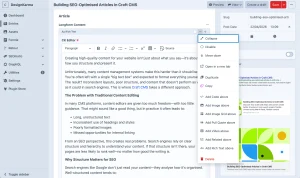
Instead of relying on a single WYSIWYG editor, you can create flexible content layouts using “blocks” (via the Matrix field). Each block has a specific purpose, helping guide content editors toward better decisions.
Rather than asking:
“How should I format this?”
You’re effectively saying:
“What type of content do I want to add here?”
That small shift makes a big difference.
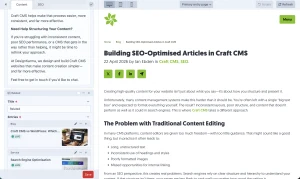
Craft evens lets you preview your article in real time as you edit, on desktop, tablet and smartphone viewports.
A Real Example: Building an Article Page
On a typical article page, we often create a set of reusable content blocks that editors can mix and match depending on the needs of the page.
For example:
Rich Text
This is where the main body content lives. Using the CKEditor plugin, we can control which formatting options are available—encouraging proper use of headings, lists, and links without overwhelming the editor.
Image Block
Instead of dropping images into a text editor, this provides a dedicated image field with optional captions.
Captions aren’t just helpful for users—they can also support accessibility and provide additional context for search engines.
Image Grid
Sometimes a single image isn’t enough. A grid layout allows multiple images to be displayed cleanly, with control over the number of columns, lightbox effect and so on.
This helps create more visually engaging content without relying on clunky formatting tricks.
Image Slider
Used sparingly, sliders can be useful for showcasing a sequence of images. The key is that they’re intentional and controlled—not something editors have to hack together themselves.
Pull Quote
Pull quotes help break up long sections of text and draw attention to key ideas. They improve readability and keep users engaged—both important factors for SEO.
Related Entries
This is one of the most powerful blocks from an SEO perspective. It allows editors to link to other relevant pages or articles directly within the content. That means internal linking becomes part of the content creation process, rather than an afterthought.
Video
Embedding a video (for example, from YouTube) is as simple as pasting in a URL.
Video content can significantly increase time on page and engagement—both positive signals for search engines.
Why This Leads to Better SEO
The real benefit of this approach is consistency. Instead of relying on content editors to remember best practices, those practices are built into the system itself.
The result is content that is:
- Easier to read
- Better structured
- More engaging
- Naturally optimised for search
It also scales. Whether you’re publishing one article a month or ten, the quality and structure remain consistent across the site.
Craft CMS vs Traditional Editors
Many platforms (including WordPress) rely heavily on large, flexible editors that can quickly become messy without careful management. Craft CMS takes a more structured approach, giving you flexibility without sacrificing control.
For businesses that take content seriously—whether for SEO, marketing, or both—that structure can make a significant difference over time.
The Bigger Picture
Ultimately, better SEO content isn’t just about keywords or technical tweaks. It’s about creating content that’s clear, useful, and engaging—and presenting it in a way that both users and search engines can understand.
Craft CMS helps make that process easier, more consistent, and far more effective.
Need Help Structuring Your Content?
If you’re struggling with inconsistent content, poor SEO performance, or a CMS that gets in the way rather than helping, it might be time to rethink your approach.
At DesignKarma, we design and build Craft CMS websites that make content creation simpler—and far more effective.
Feel free to get in touch if you’d like to chat.



Thanks for reading